Company Elements
My Company shows information about your company, and Company Profile shows information about a selected third-party company. Much of the information elements are the same between these views.
Company Summary
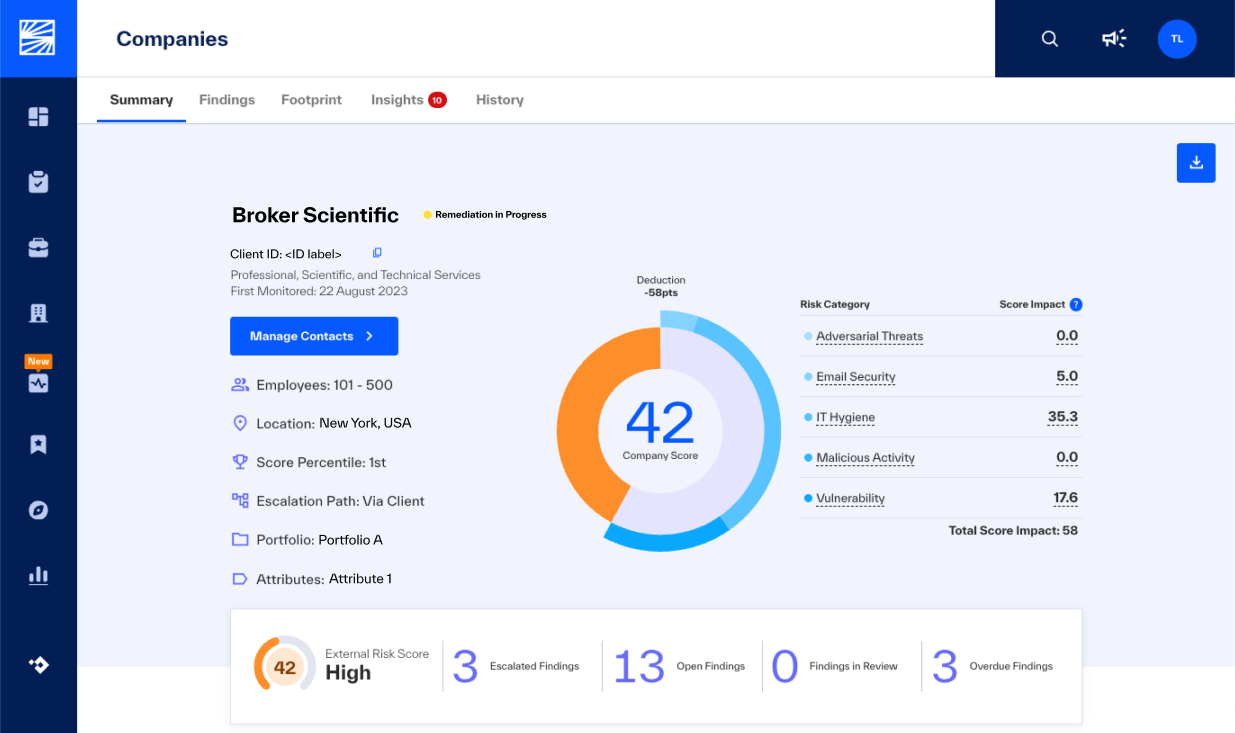
The company summary shows information about the company and its TPRM scores, such as:
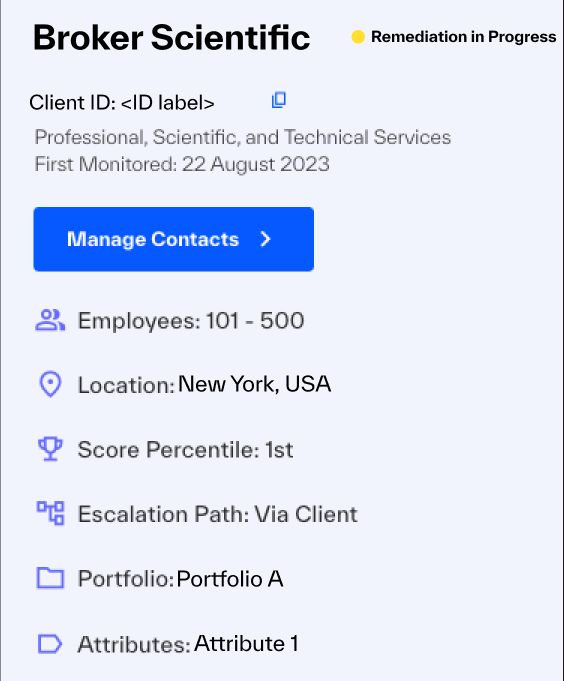 |
Escalation Status shows the escalation status of the company, by the status of observed Risk Findings.
Client ID show your ID for the company. If you do not see this, ask your BlueVoyant project manager or Client Success Manager.
Industry shows the NAICS name of this company's industry. You can use this to compare the company’s risk management performance with other companies in the same industry.
Manage Contacts opens the window to keep your vendor information.
Employees is how many employees are with the company. This can be a useful metric in risk assessment for the company. In general, with more employees there are more internal assets and attack vectors, which can correlate to higher risk.
Location is the primary geographic location of the company.
Score Percentile shows how effectively the company manages its risk in relation to its peers (companies in the same industry with digital footprints in the same size range).
Escalation Path shows to whom the ROC escalates Risk Findings.
Portfolio shows which of your portfolios has this company.
Attributes shows the attributes you applied to this company.
Risk Finding Summary Bar
This set of metrics shows the most recent Risk Score of the company and the status of all Open Risk Findings.
 |
External Risk Score
The External Risk Score is the calculated level of cyber risk of a company.
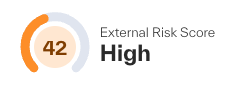 |
The risk score is a value between 0 and 100. The lower the score, the higher the risk. The risk score is updated each day. It is calculated as a weighted average of the five risk categories: Email Security, IT Hygiene, Vulnerability Detection, Malicious Activity, and Adversarial Threat.
Scores are in color-coded severity ranges:
Score | Severity |
0 - 39 | Critical |
40 – 59 | High |
60 – 79 | Moderate |
80 – 100 | Low |
Limited Visibility Label (Company Profile)
For companies with low asset counts from their footprint, investigate the company footprint data. Your CSM or the ROC will apply it to the company profile. Look for missing IP address ranges and domain information. If necessary, you can request that BlueVoyant contact the company for more information.
To learn more about footprints, see Assessing and Managing Footprints.
Escalated Findings
The Escalated Findings value shows how many findings for the company exceed your risk threshold and that the ROC escalated for investigation and remediation.
To see Findings, filtered to show all escalated findings, click the Escalated Findings value.
 |
Findings – Open, In Review, and Overdue
These widgets show you the escalation status of findings for the company. Click on each widget to open Findings, filtered for all findings in that status.

Open: The Risk Finding has more than one observation that is not closed.
In Review: The ROC investigates and confirms this finding.
Overdue: The ROC escalated the Risk Finding by the configured policy for escalation and follow-up, but the Risk Finding remains open.
These widgets filter the Findings table.
Widget | Filters |
Open Findings | Open findings of all Escalation statuses |
In Review Findings | Open findings with an Escalation status of In Review |
Overdue Findings | Open findings with an Escalation status of Overdue |
Overdue Policy
You can choose options to configure your policy for overdue findings. You determine when a case is overdue and configure the follow-up schedule. The default policy has a follow-up schedule of every seven days. After three follow-ups, the case gets the Overdue status.
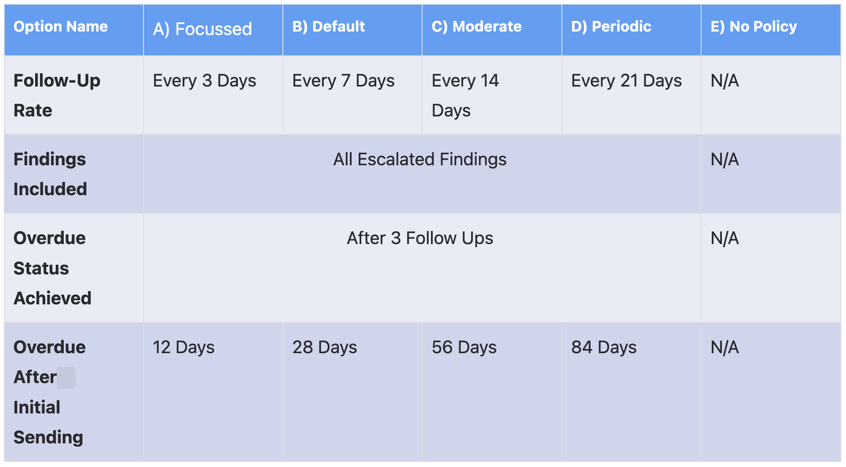 |
The Overdue Policy is applied to all your portfolios.
Escalation Contacts
Escalation contacts are individuals at a third-party company (referred to as vendor contacts) who are the designated contacts with whom the BlueVoyant ROC will communicate when escalating risk findings. We also allow the management of client contacts which are internal members of your team who wish to be contacted in the event of an escalation being generated for a third-party company. This feature enables you to manage the contact information used by the BlueVoyant Risk Operations Center for risk escalations.
Adding a New Contact
To add a new escalation contact, do the following:
Note: From the Companies page you are able to edit and delete currently configured vendor contacts. You can also add new, or delete existing client contacts within the Manage Contacts interface.
First select the companies whose contacts you wish to modify
Next, select the manage contacts button
 |
A modal will populate with all of the currently configured contacts associated with each of the companies you selected in the previous screen. To add a new contact, select the ‘Add Client Contact’ button in the lower right corner of the modal.
When adding a new contact you must fill out all required fields, key to remember:
Name, email, job title and escalation preference are required
Escalation preference determines whether a contact is added to the ‘To’ field (Primary) or the ‘cc’ field (Notification) of the Escalation Email issued by the ROC
Note: Only client contacts will be added in this workflow, contact type will default to Client.
 |
Click the check mark in the actions column once all fields are entered. A success dialog will appear briefly to indicate that the client contact has been added to all selected vendor companies:

To edit or delete an existing contact, select the appropriate action from the action colum to the right of the contact information.
From the Company detail page you can add, edit and delete vendor contacts as well as add and delete client contacts for the selected company.
First select Manage Contacts
 |
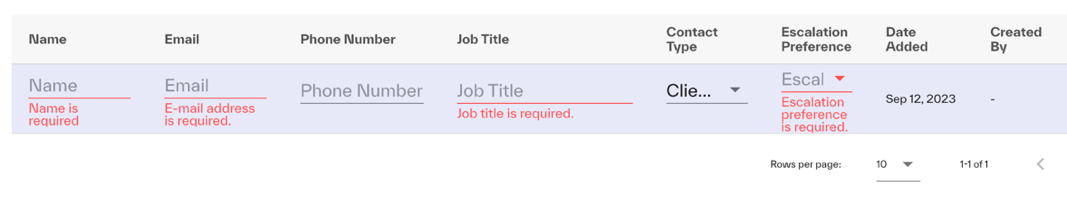
The modal will present all currently configured contacts associated with this company. Similar to the companies page, Name, Email, Job Title and Escalation preference are required fields. Escalation Preference determines whether a contact is added to the ‘To’ field (Primary) or the ‘cc’ field (Notification) of the Escalation Email issued by the ROC
Note: You can add both Vendor and Client Contacts on this page by selecting the desired contact type within the modal.
 |
Confirm your changes via the action column at the far right of the modal table once complete.
 |
Deleting a Contact
To delete a contact, vendor or client do the following:
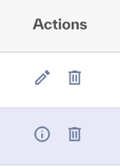
Select the trash can icon located in the actions column within the Manage Contacts modal from either the companies or company detail pages:
 |
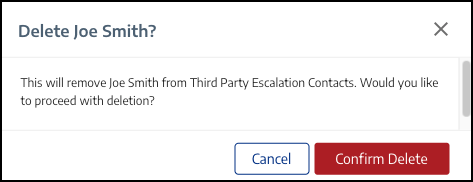
A confirmation dialog appears. Click Confirm Delete to delete the contact:
 |
Exporting the Contacts List
To download a list of all escalation contacts shown for the current company (or selection of companies), click the Export button at the lower right of the modal:
 |
Company Summary
 |
Risk Category Score
This widget shows how the Risk Score was calculated, and which risk categories are the highest level of risk to the company.
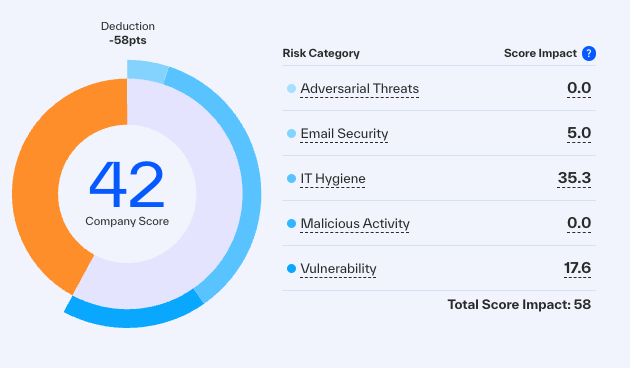 |
To see more information, hover over each element. This shows more about how the score was calculated and findings that affected the score.
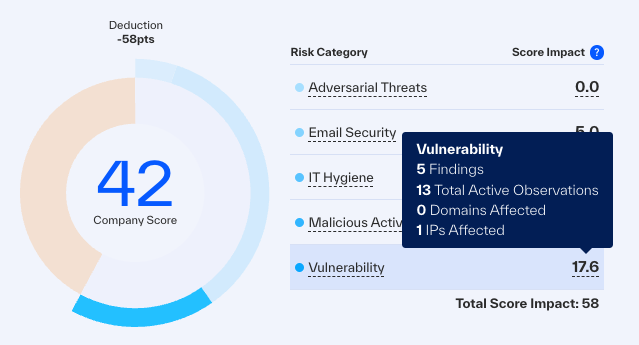 |
Risk Categories
BlueVoyant Cyber Risk Service uses a public and proprietary data sources, analytical strategies, and machine-learning algorithms to identify, prioritize, and give recommended remediation for these risk categories:
Email Security: Identification of correct configuration and best practices for Email Security, such as use of spoofing and spam protection.
IT Hygiene: Identification of misconfigured network infrastructure, such as open ports, out-of-date browsers and operating systems, and the use of file-sharing and torrent applications in the company’s network.
Vulnerability Detection: Identification of exposed vulnerabilities that can be exploited, such as incorrect use of certificates.
Malicious Activity: Identification of malware, phishing, and ransomware from the third-party network, and detection of third-party connections with infrastructures such as darknet and botnets.
Adversarial Threat: Monitoring of attacks directed at the third party, such as inbound phishing and connections to attack infrastructures.
Score Over Time
This widget shows the trends of the company Risk Score, to see changes over time. The chart is overlaid with peer band and peer average risk scores for a quick comparison against peers in the company’s industry.
To see more information and score values for the last 30 days, hover over the graph.
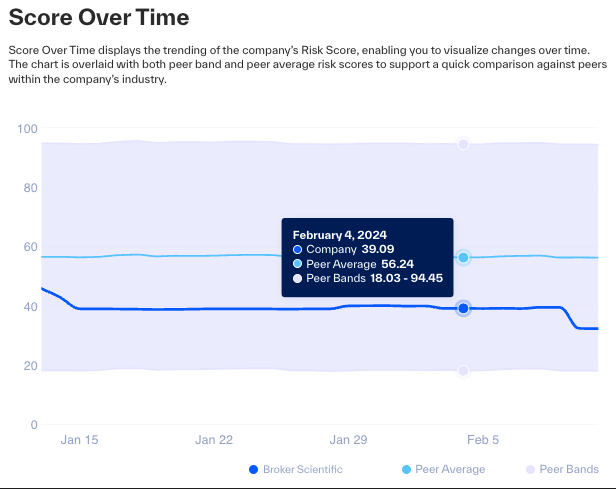 |
Peer Performance
This widget shows how the company’s security posture compares with that of its industry peers, by each of the five risk categories.
To see more score and performance information, hover over the graph.
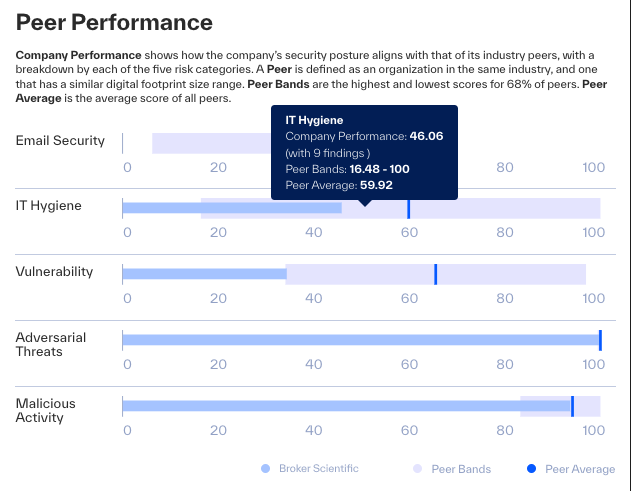 |
Recent Escalated Findings
This table is a focused view on only Escalated Risk Findings with an impact on the company’s Risk Score. This helps you prioritize the most important findings.
To see more information about a finding in Finding Details, click the finding in the table.
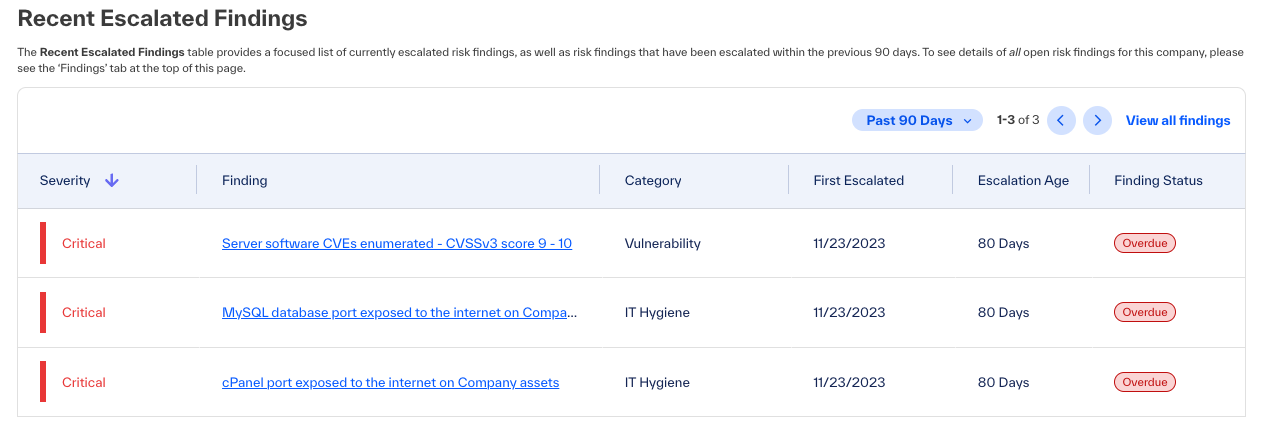 |
Note
First Escalated date is when the ROC escalated the first event of this finding.
Escalation Age is how many days from the First Escalated date, to see how long an escalation is open.
Emerging Vulnerabilities
The Emerging Vulnerabilities widget lets you track the recently published emerging vulnerabilities (EVs) for the company. The widget shows EVs from the last four months in a calendar view and a list view.
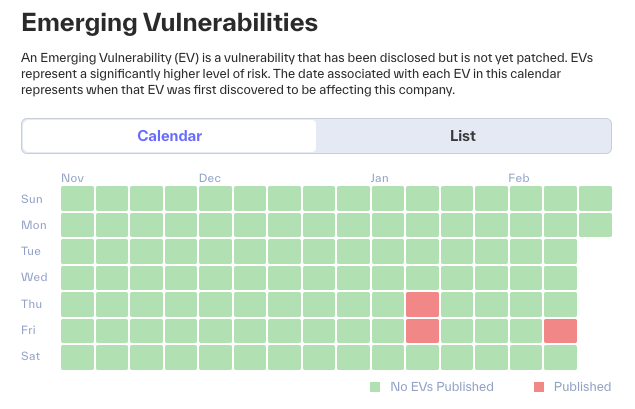 |
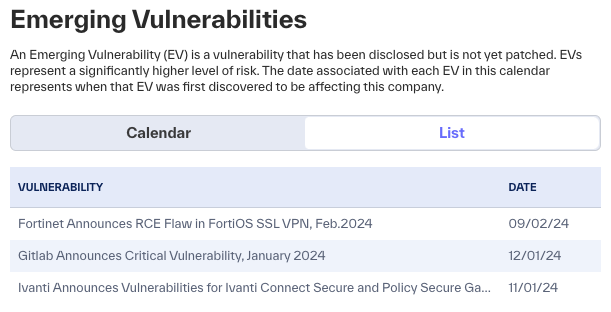 |
To see escalation information for this company, hover over an orange tile in the calendar view, or see the list view table.
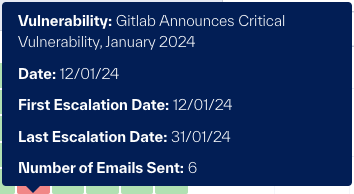 |
Mean Time To Remediation
The Mean Time To Remediation widget shows the total of escalated findings resolved each month and the mean time to remediation. These important data points help you understand how well the BlueVoyant service enables remediation of risks in your supply chain.
BlueVoyant is not responsible for remediation. Our responsibility is to identify, confirm, and escalate findings.
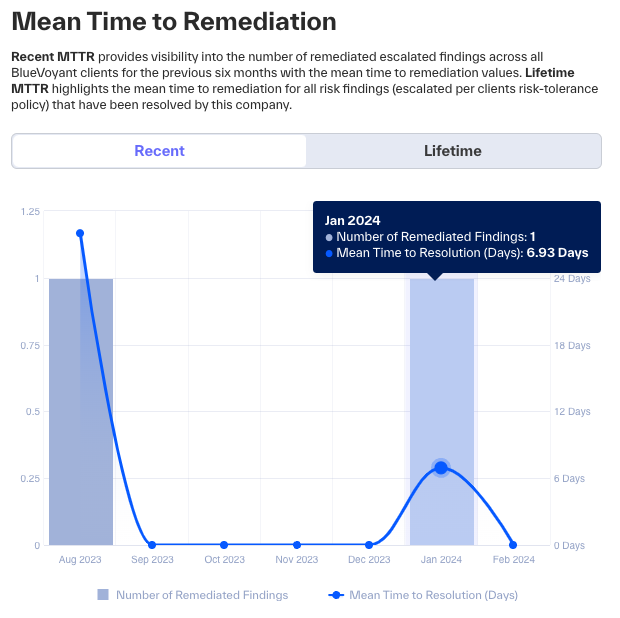 |
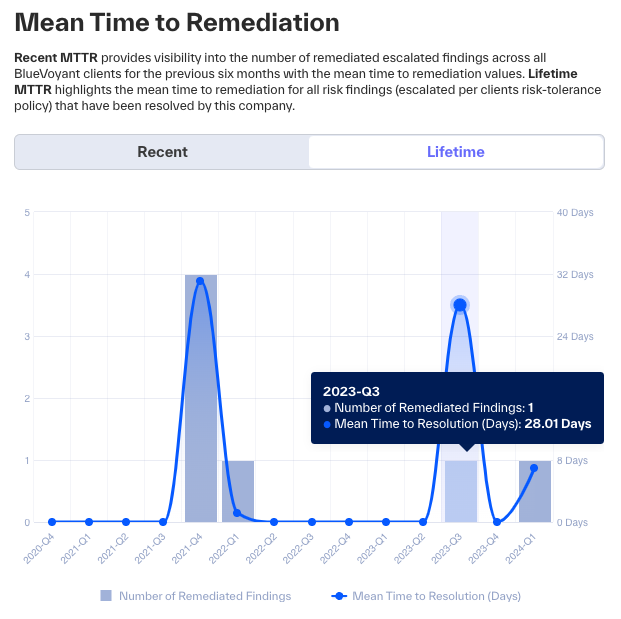 |
To see the total findings resolved in a month or quarter and the mean time to resolution of those findings, hover over that month or quarter in the graph.
Credential Breach Insights
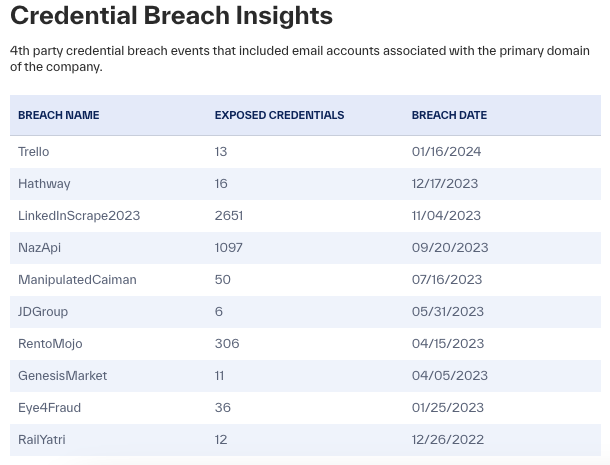
The Credential Breach Insights widget shows 4th-party breaches that used email accounts of the primary domain of the company.
To open Insights and see more information, click an event.
 |
Ransomware Findings
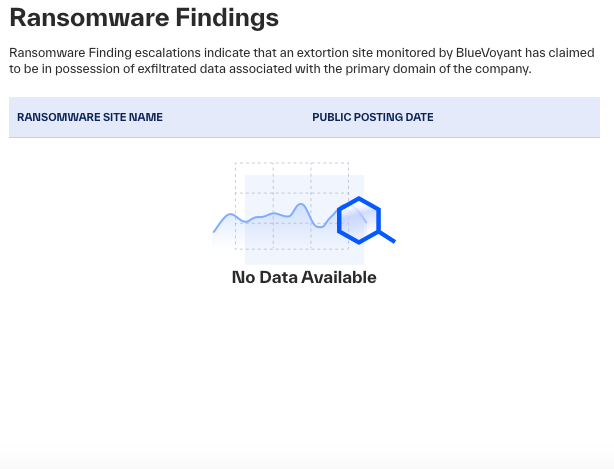
The Ransomware Findings widget shows active Company Involved in Possible Ransomware Incident findings.
 |
Export Company Profile as PDF
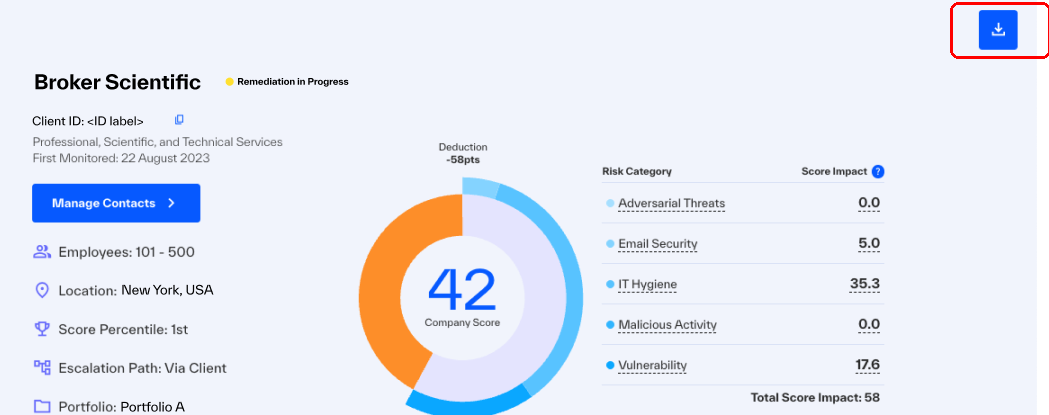
You can export a Company Profile, with all graphics, tables, charts and information, to PDF.
Open the Summary of a company.
Click
 .
.
Company Findings
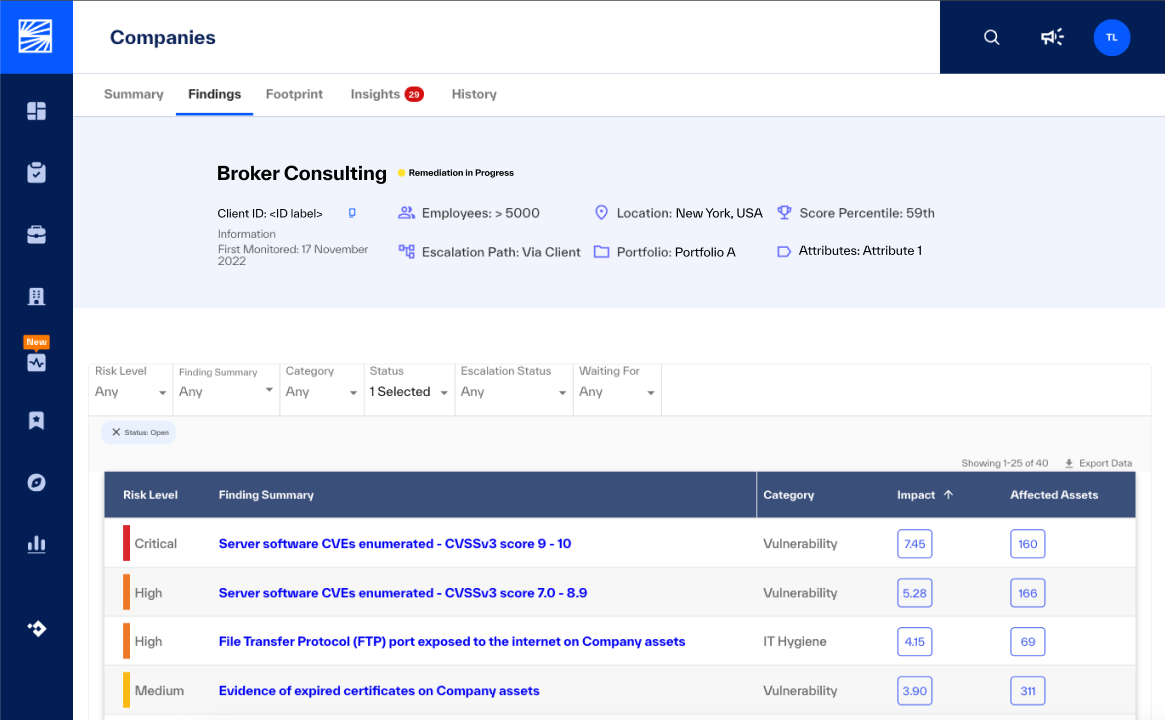
In a company profile > Findings, you see all open findings that the BlueVoyant Cyber Risk Service identified for the company.
You can Configure Filters on Findings
Select a finding to open Finding Details to cooperate with the ROC for remediations
 |
Company Footprint
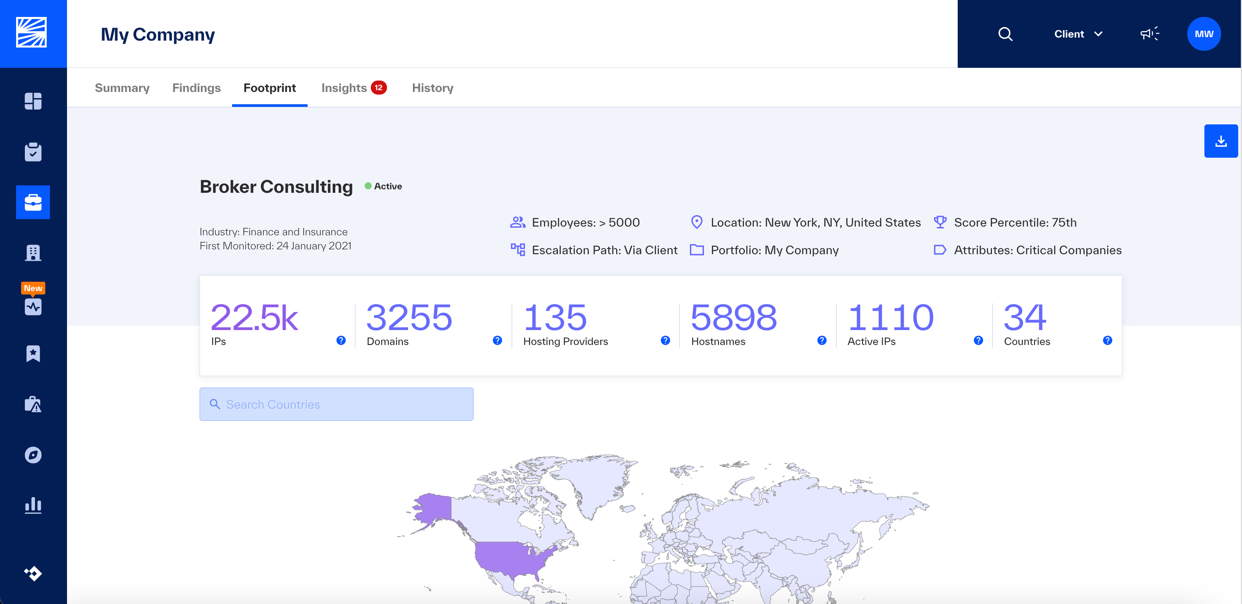
The Footprint shows the external IT footprint of the company that is used to calculate its Risk Score.
The footprint is the collection of company data:
Domains, hostnames, and IP address ranges
Registrant information
Observed hosting providers
Observed hosting geographic locations and IP addresses
 |
To learn how to effectively understand and manage your footprint and the footprints of your monitored companies, see Assessing and Managing Footprints.
Company Insights
Insights shows usage analytics of cybersecurity and business application hardware, software, and SaaS. It shows information on fourth-party credential breaches, re-used passwords, and ransomware events. New Insights are created by the BlueVoyant Cyber Threat Intelligence Analytics Team as a rapid response to newly identified cybersecurity risks.
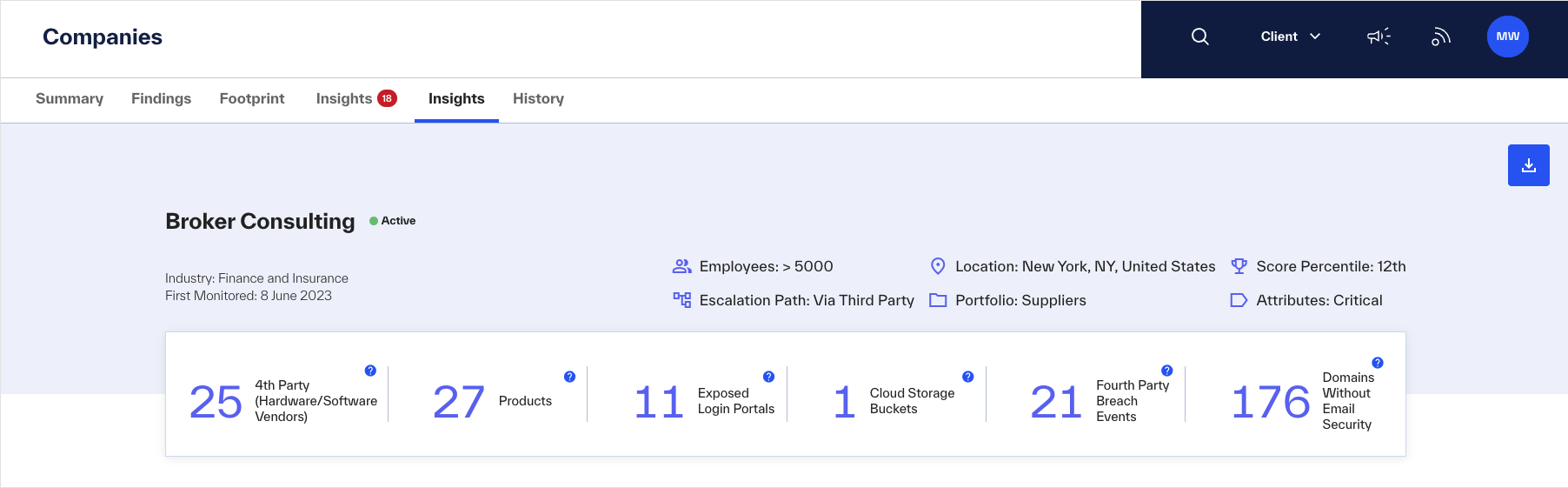 |
Fourth-Party Hardware and Software Vendors - Count of observed, unique hardware and software vendors in this company’s footprint of external assets.
Products - Count of observed, unique products in this company’s footprint of external assets.
Exposed Login Portals - Count of observed, unique Internet login portals in this company’s footprint of external assets.
Cloud Storage Buckets - Count of observed, unique Cloud Storage Buckets in this company’s footprint of external assets.
Fourth-Party Breach Events - Count of fourth-party breach events observed in the last 12 months.
Domains Without Email Security - Count of observed, unique domains without email security in this company’s footprint of external assets.
The Insights – Vendor and Product Detections is a dynamic visualization to navigate through observed products and vendors, structured by industry recognized service categories.
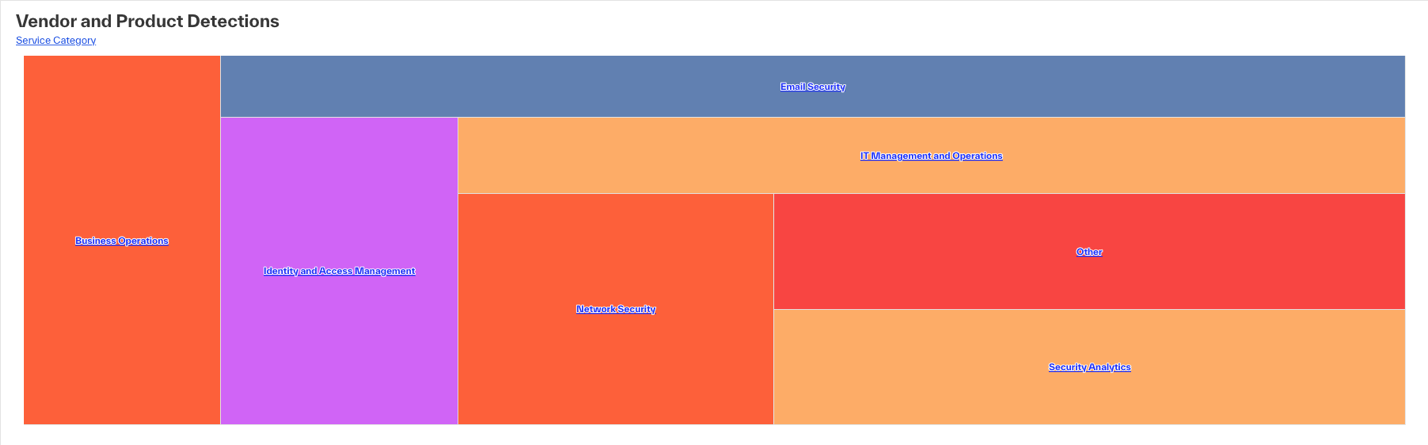 |
Network Security - Products that protect a company network from unauthorized access, intrusions, and other threats.
Endpoint Security - Products that protect end-user devices (desktops, laptops, and mobile devices) from cybersecurity threats through technology such as: antivirus, endpoint detection and response (EDR), extended detection and response (XDR), managed detection and response (MDR), and other security technology.
Identity and Access Management - Products that enforce a framework of policies to make sure that users have appropriate access to a company’s technology resources.
IT Management and Operations - A general category of products for the organization and management of software, technologies, and services used by a company.
Business Operations - A general category of products for business operations, continuity, sales, and collaboration.
Fraud Protection - Online or deployed software that detects illegitimate and high-risk online activities. These tools continuously monitor user behavior and calculate risk to identify potentially fraudulent purchases, transactions, or access.
Email Security - The prediction, prevention, detection, and response framework for email protection against attacks unauthorized access. Email security spans gateways, email systems, user behavior, content security, and supporting processes, services and adjacent security architecture.
Security Analytics - Software, algorithms, data collection, data aggregation, and analysis tools for proactive threat detection and security monitoring.
Threat Intelligence - Products and services that deliver information about cybersecurity threats and related issues. The curation of information about identities, motivations, characteristics, and methods of threats, known as tactics, techniques and procedures (TTPs), enables better decisions and improves security technology, to reduce risk and the chance of being compromised.
Internet of Things - Managed IoT services for connectivity, data collection, analysis, and decision services that are necessary for connected products, such as cellular (2G, 3G, 4G/LTE, and 5G), satellite, LPWA networks (3GPP and non-3GPP) and managed field-area networks (FANs).
Training - Security awareness training software gives businesses online courses to train and assess their employees' security readiness. Many of these tools deliver simulated attacks or fraudulent emails to help employees better identify malicious content before they see it in real-life.
Governance, Risk and Compliance - GRC software manages the flow and accessibility of information in an organization. Businesses use GRC products to identify risks, implement policies, and track compliance.
Testing - Application Security Testing (AST) products and services that analyze and test applications for security vulnerabilities.
Deception - Deception technology software helps detect, analyze, and protect against unknown threats. It uses decoys, traps, lures, honeypots, and other deceptively attractive data sources, to let threat actors think they discovered vulnerabilities or valuable data.
Security Instrumentation - (aka deep security instrumentation) embeds sensors in applications to protect themselves from sophisticated attacks in real-time.
Other - Detections that are not in a service category.
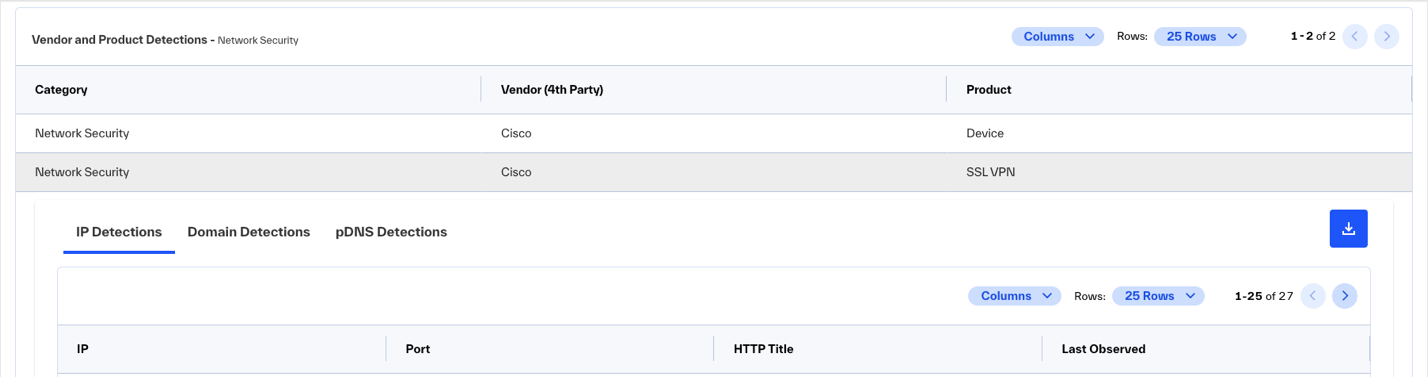
The Insights – Vendor and Product Detections table shows the observed detections across all service categories, vendors and products. You can filter the data for easier investigations.
To see the unique observations of a selected product, click a row in Insights – Vendor and Product Detections.
IP Detections - Products identified from IP assets
Domain Detections - Products identified from DNS records
Passive DNS Detections (pDNS) - Products identified by observed DNS requests from IP assets
 |
Exposed Login Portals - (For business use only.) To prevent unauthorized access and potential business disruptions, secure these portals behind a firewall or VPN.
Cloud Storage Buckets - Cloud storage organizes objects into web-accessible buckets. Identify assets for public delivery (such as website assets), and protect private data storage with secret keys. If you allow access to the full bucket index, it may be a misconfiguration.
Fourth Party Breach Events - Corporate email accounts were found in data dumps from breaches of external services. For example, @yourcompany.com email addresses appeared in dump data from the Experian breach.
Domains Without Email Security - Company domains without an identified third-party email security protection.
 |
Event History
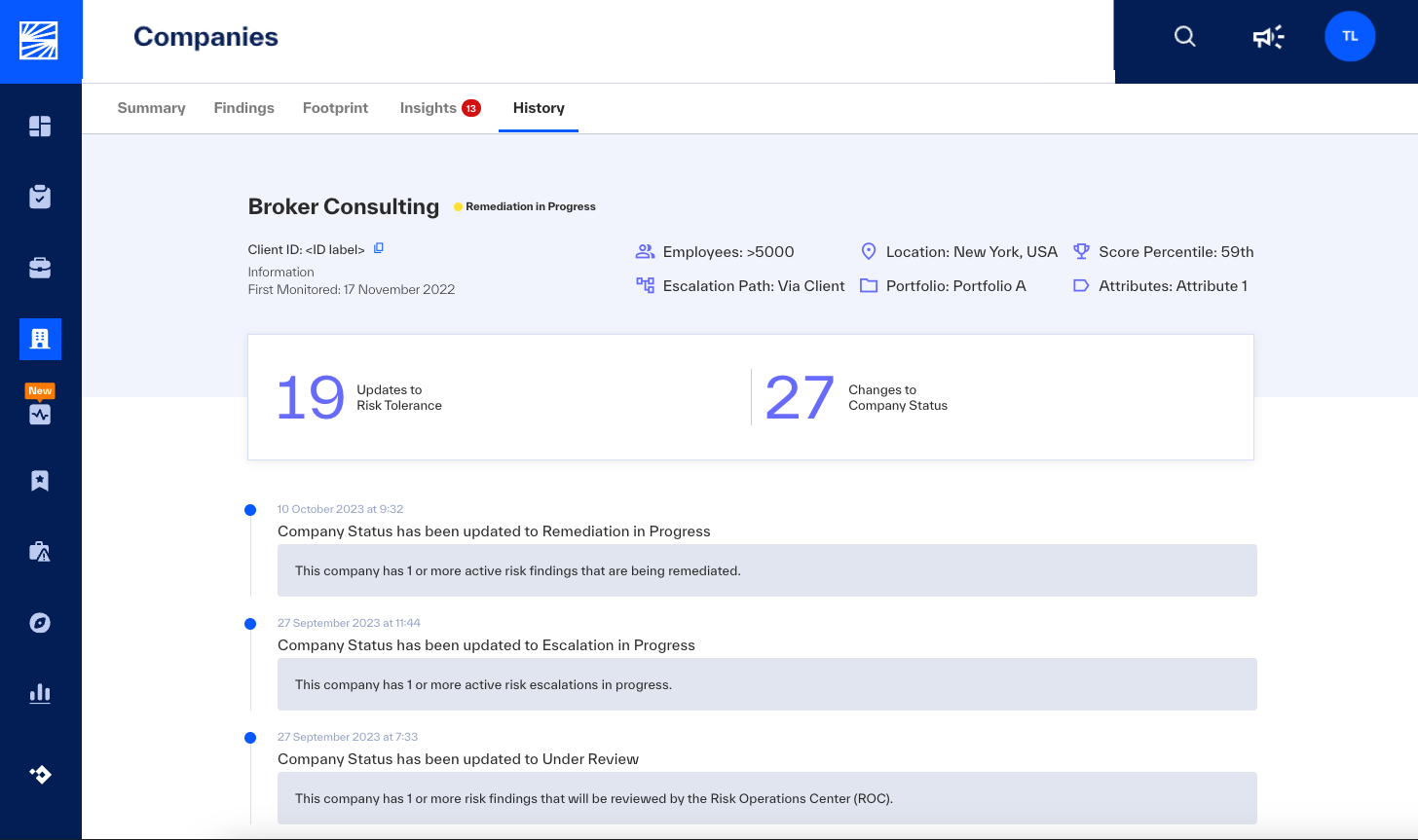
History shows a timeline of events associated with your service. Use the audit trail to quickly see the main security events of a service: status changes to the company’s risk score, tolerance, and escalated findings.
 |